Desktop companion for macOS

Marina

VRM avatar, local voice, 8 GB of RAM

She lives on your desktop in a transparent window. Talk to her or type, and she answers in her own voice, lip syncing and acting out what she writes. You can cut her off mid sentence, and sometimes she starts the conversation.

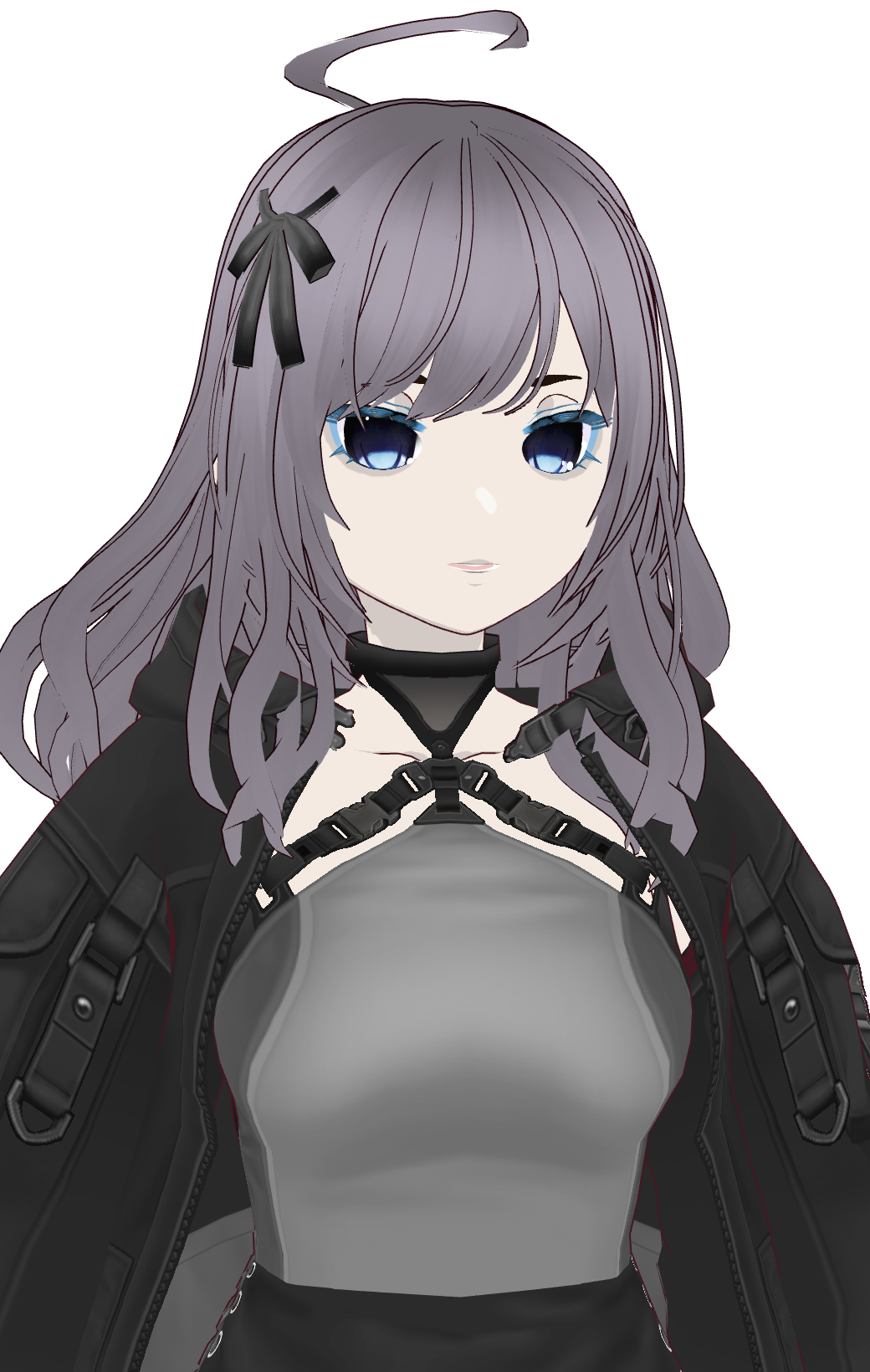
Marina, an anime character with long lilac hair, a black ribbon and a dark jacket, on a transparent background
blinks and holds your gaze
5 mouth shapes from formants
195 spring joints
01

Try her

This is the real app interface running in your browser, with the same renderer, lip sync and gestures as the desktop version. Her window is transparent, so she stands over whatever is behind her.

Say something
  • 01Type in the box under her and press Enter, or tap one of the lines above.
  • 02Move your mouse over her. Her eyes follow you, and the buttons along the top fade in.
  • 03Go quiet for a bit and she will say something on her own.
  • 04Got your own avatar? The person button at the top loads any .vrm file. It stays on your computer.

Replies on this page are recorded lines in her real voice, picked by keyword. The desktop app answers with a live language model, hears you through the microphone and lets you talk over her.

02

What she does now

She is written as a friend and not an assistant. She has opinions, a TikTok edit she will not stop complaining about, and permission to be busy or just not help.

0.00 ms between sentences

Talks while she thinksnew

Replies stream in and she speaks them a sentence at a time, so the first words are out while the model is still writing the rest. Each sentence is lined up on the audio clock so there is no gap between them.

stops mid word

You can cut her offnew

The mic stays open while she talks, so interrupting her is just talking over her. Only what she actually said goes in the transcript, so her next line follows from what you heard.

quiet overnight

She speaks firstnew

She has her own thing going on and will bring it up now and then without being asked. It is rate limited, stays quiet at night, and there is a switch for it in the tray.

19 gestures

Performed, not narrated

When the model writes *tilts head* it gets cut out of the speech and played as an animation, timed to the point in the audio where it was written. Between replies she shifts, glances and settles on her own.

aa ih ou ee oh

A mouth, not a hinge

Loudness sets how far her mouth opens and the balance between the first two formant bands picks one of five shapes, so it changes with the vowels. Sibilants get damped so every "s" does not look like a shout.

195 joints

Hair with real physics

The model already has spring bones. A simulated breeze leans the direction each joint falls, so the physics does the work and long strands swing further than short ones.

survives restarts

She remembers you

Facts worth keeping get pulled out of your conversations and fed into later ones. Say "remember that" and it is saved straight away, whether or not the model noticed.

all local

A few small skillsnew

She can set a timer, read what you just copied, open a link or write something down. She knows the time, which app you are in and when your battery is low. She looks at your screen only when you press the button.

GPU server or this Mac

Pick her brainnew

Point her at any OpenAI compatible model. Mine runs on a GPU server over an SSH tunnel, and if that goes quiet she falls back to a small model on the Mac and tells you she did.
03

Her voice

Kokoro, an 82M parameter voice model, running on the laptop's CPU at about three times realtime. Two voicepacks are blended for her tone and then pitched up a semitone without changing the timing.

Greeting
Oh, you're back. I was just about to give up on that transition.
Declining to help
Yeah no, I'm busy losing a fight with the borrow checker.
Her own problems
Forty takes on one transition. Forty. The algorithm better appreciate this.
04

What stays on your Mac

Your voice never leaves the machine in either direction. I checked by watching the bridge's connections through a full conversation. The only text that leaves goes to whichever model you point her at, so with Ollama on the same Mac nothing leaves at all.

Stays on the MacLeaves the Mac
Microphone audioTranscribed locallyNever
Her voiceSynthesised locallyNever
Conversation and memorySaved to disk here
What you said, as textSent to your model
Clipboard, when she reads itSent to your model, and you can turn it off
ScreenshotsOnly when you press the buttonSent to your vision model
05

Run the real thing

It needs a Mac. I built and tested it on an M2 MacBook Air with 8 GB of RAM.

step 1

Clone it to your home folder

Keep it at ~/marina. Desktop, Documents and Downloads are protected by macOS, and the app hangs with no error if it lives in one of them.

git clone https://github.com/skep13/marina ~/marina
cd ~/marina && ./setup-mac.sh
step 2

Give her a brain

The easiest option is Ollama on the same Mac. Copy the example config and set base_url to your Ollama address.

ollama pull llama3.2:3b
cp character_config.example.yaml character_config.yaml
# base_url: "http://127.0.0.1:11434/v1"
step 3

Add an avatar

Export a VRM from VRoid Studio (a .vroid project file will not load) and put it at app/models/model.vrm, or pick one with the person button once the app is open.

step 4

Build the app

This makes Marina.app, puts it in Applications and starts her backend for you. The first reply is slower while the speech and voice models load.

./build-app.sh
Talk Space to start and again to stop, or the mic button
Cut her offTalk over her, or .
Hide or show H
Quit from anywhere Q
ButtonsHidden until you hover over her, so she looks clean the rest of the time
06

Measured, on the machine it was built for

A MacBook Air with 8 GB of RAM. Every number below was taken on it, and that limit shaped the whole design.

Speech to text0.98 s for 8.5 s of audio with Faster-Whisper base.en on the CPU
Text to speech3.3x realtime once warm with Kokoro 82M on the CPU
Between sentences0.00 ms gap, because each one is scheduled on the audio clock
Language modelabout 55 tok/s with Qwen3-VL 8B on my GPU server, or 37 to 44 tok/s with llama3.2:3b on the Mac
Full turn, warmabout 1.5 s from message to speech
Avatar53k triangles, 20 MToon materials and 195 spring joints, drawn at display refresh
Memory footprintabout 1.5 GB for the bridge, renderer and avatar together